
Getting Started with AuctionRPM
Take a guided introduction to AuctionRPM and learn the basics of getting the system ready for your auction business. This tutorial walks you through the essential first steps so you can begin using AuctionRPM quickly and confidently.

Get familiar with the heart of AuctionRPM! This tutorial introduces the AuctionRPM Main Menu and shows you how to navigate the system and quickly access the tools and features you’ll use to manage your auction business.

Every auction company works a little differently—and AuctionRPM is designed with that in mind. This tutorial shows how Settings and Defaults allow you to customize AuctionRPM to match the way your auction business operates.

Everything in its place. Master Data gives you one central location to find and manage the supporting lists and information used throughout AuctionRPM, making important data easy to locate, maintain, and reuse.

Pre-lotted or non-lotted—which approach is right for your auction? This discussion explores the differences between these two auction methods and how each affects the way an auction is prepared and conducted in AuctionRPM.

Every auction has to start somewhere! Before you can enter inventory, register bidders, or begin selling, you first need to tell AuctionRPM about the auction you’re going to hold. This tutorial shows you how to take that important first step by setting up a new auction.

Pre-lotted auctions open the door to even more of AuctionRPM’s capabilities. This tutorial introduces Inventory Management and shows how AuctionRPM helps you organize and manage the items that will be sold in an upcoming pre-lotted auction.
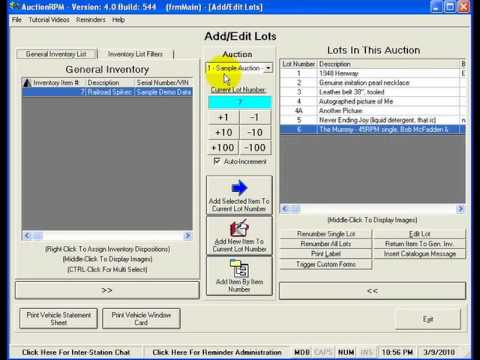
Have inventory already waiting in your warehouse—or are you cataloging an auction from scratch? This tutorial shows how to add lots to a pre-lotted auction in AuctionRPM, whether you’re assigning existing inventory to an auction or entering items specifically for an upcoming sale.

A picture really can be worth a thousand words—especially when you’re selling inventory. AuctionRPM gives you several ways to assign photos to the lots in a pre-lotted auction, allowing those images to be used throughout the system, from catalogs and web pages to the Audience Lot View presentation screen.

Absentee and phone bids can add valuable opportunities to your auction—but only if they’re managed properly. This tutorial shows how AuctionRPM helps you track left bids and phone bids so you can confidently serve bidders who can’t participate in person.

Want to let your buyers know about an upcoming auction? AuctionRPM makes it easy! Email Broadcasting lets you communicate directly with your buyers and promote upcoming auctions without having to manage a separate mailing list.

Direct mail can be even more effective when you send it to the right buyers. AuctionRPM can create mailing labels for your customers—and even use their previous buying habits to help identify the buyers most likely to be interested in the merchandise being offered in a particular auction.

What good is a great auction if nobody knows about it? AuctionRPM makes it easy to turn your pre-lotted inventory into online catalogs and publish them to your website, helping potential buyers see what you’ll be selling before auction day.
Give your bidders a professional, real-time view of the auction as it happens. AuctionRPM’s Audience Lot View is designed for projection or large-screen display, showing buyers the lot currently being sold and helping everyone follow the progress of the auction.

Bidder registration is more than simply handing out a bidder number. AuctionRPM makes it easy to register your bidders, capture important customer information, and even track how they heard about your auction—giving you valuable insight into which advertising efforts are actually bringing buyers through the door.

During a pre-lotted auction, the Bid Entry clerk has one of the most important jobs in the room. AuctionRPM puts the necessary information and data-entry tools at the clerk’s fingertips, helping them quickly and accurately record each winning bidder and selling price while keeping pace with the auctioneer.

In a non-lotted auction, the Bid Entry clerk has to capture the sale as it happens. With no inventory information entered in advance, AuctionRPM provides a specialized Bid Entry screen that puts the tools needed to enter item information, the winning bidder, and the selling price all in one place.

The bidding is finished—now it’s time to get your buyer checked out and on their way! AuctionRPM’s invoicing system is designed to make checkout fast and easy while still providing the flexibility needed to handle the many different situations that can arise at an auction.

What good would auction software be if you couldn’t get the information back out of it? AuctionRPM includes more than 200 reports, covering everything from mailing labels and catalogs to consignor fees, accounting, marketing analysis, and much more.

The auction is over, the buyers have been invoiced, and everything is finished… right?
Not quite! It’s time to pay your consignors. AuctionRPM takes much of the work out of consignor settlement by calculating your company’s share, determining what each consignor is owed, and even printing the checks for you.

Some auction sales require more than an invoice—they require paperwork specific to the item being sold. AuctionRPM’s Custom Form Processing lets you create your own forms, automatically fill them with information already stored in AuctionRPM, and even have certain forms print automatically when they’re needed.

Auction expenses aren’t always as simple as they seem. From title and document fees charged to buyers, to pickup expenses charged to consignors, to advertising costs shared proportionately among multiple consignors, AuctionRPM gives you the flexibility to handle expenses the way your auction business requires.

Want to expand your auction beyond the people sitting in the room? AuctionRPM can prepare the data files required by various auction simulcasting services, helping you connect your AuctionRPM auction data with the services that bring remote bidders into your live auction.

Need to run AuctionRPM on multiple computers? This tutorial explains the network configuration AuctionRPM requires and provides network administrators with the information they need to properly connect multiple workstations to the system.
